
How Calendar Family Looks After Your Calendars
When you connect a calendar to Calendar Family, you're trusting it with the place where your work, your family and your appointments live. That's a lot to ask, so we think you should know exactly what it will do there.
That's why we wrote down the rules that Calendar Family's sync follows, each one in terms of what you'll see in your calendars. Every rule has automated tests that check it, and we exercise those tests too, by switching a safeguard off on purpose to confirm that its test notices.
Here's what those rules mean for you.
Your events stay yours, by default
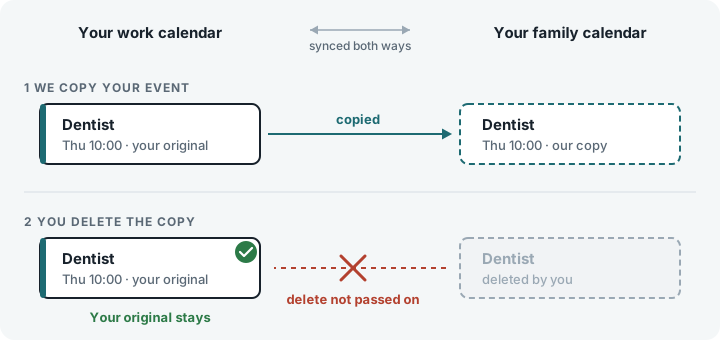
Calendar Family works by making copies. When an event you created in one calendar appears in another, the one in the other calendar is the copy we made, and the one you created is your original. By default, Calendar Family changes and deletes only the copies it made, and leaves your originals as you left them.
- If you delete the copy we made in one calendar, your original event in the other calendar stays where it is. That holds in a two-way sync too.
- If you edit a copy, your original isn't changed. The next time your original changes, we update the copy to match it, which replaces your edit.
If we find the same event already in both calendars before you start syncing, we show you each pair and leave both events alone, unless you choose to keep that pair in step. If you do, a change to one event is copied to the other in the direction your connection syncs, and we leave alone any event that has other people on it. By default, we don't delete either event.
Copies follow your originals
- When your original changes, we update its copy. Move your dentist appointment and the copy moves with it.
- When you delete your original, we delete its copy, once your calendar confirms that the original has gone.
- If you delete a copy, we leave it deleted. It comes back only when sync starts again from the beginning: when you resume syncing after a pause, when you reconnect a calendar account that had lost access, or when we re-run your sync at your request.
- The people on your events aren't contacted. Making or changing a copy doesn't send them invitations or notifications.
When something looks wrong, sync holds back
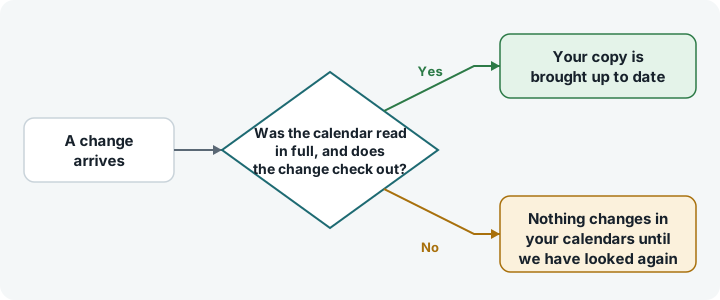
A sync service is only as good as what it can see. If we can't read a calendar properly, we treat what's in it as unknown rather than empty, so we don't delete anything because of that read. If our regular background check finds more changes of one kind than we'd expect, we hold off on them, look again, and someone on our team is alerted.
Your data
We keep the content of your events out of our logs and out of the emails we send you, the keys to your calendar accounts are encrypted, and we don't sell your data. The privacy policy sets out exactly what we keep, why, and for how long.
Tell us what you see
If anything in your calendars doesn't match what we've described here, we'd like to hear about it. Sign in and choose Get support from the menu to get in touch, and we'll look into it right away.
For how quickly changes reach your other calendars, read how real-time calendar sync works. For how to judge any sync service, read is calendar sync safe and private.